Use the API
Restful API
Once you have obtained the Access Token for your application, you can construct RESTful API requests to access Shoplazza's APIs. The request URL must include the version number to correctly identify which API version you need, using the following format:
RESTful API URL: https://{shopdomain}.myshoplaza.com/openapi/{ version }/{ endpoint }
For example, the following URL calls version 2025-06:
RESTful API URL: https://{shopdomain}.myshoplaza.com/openapi/2025-06/articles
For how API versions are named, released, and retired, see API Versioning.
Note
- All endpoints are only accessible via HTTPS.
- The base domain is formatted as https://{shopdomain}.myshoplazza.com, where {shopdomain} represents your store's unique domain.
Example of Restful API Call
The following curl request retrieves information by using the Article API and the GET /openapi/2025-06/articles endpoint. Replace {shopdomain} with your store's domain and {token} with the access token you generated in the Authentication section.
Request:
curl -X GET \
  https://{shopdomain}.myshoplaza.com/openapi/2025-06/articles/id \
  -H 'Content-Type: application/json' \
  -H 'Access-Token: {token}'
Response Example:
{
  "code": "string",
  "message": "string",
  "data": {
    "article": {
      "id": "string",
      "title": "string",
      "excerpt": "string",
      "content": "string",
      "image": {
        "src": "string",
        "width": 0,
        "height": 0,
        "path": "string"
      },
      "published": true,
      "handle": "string",
      "seo_title": "string",
      "seo_description": "string",
      "seo_keywords": [
        "string"
      ],
      "author": "string",
      "published_at": "string",
      "blog_ids": [
        "string"
      ],
      "created_at": "string",
      "updated_at": "string"
    }
  }
}
Find a resource's ID
Many endpoints take a resource ID in the path. There are two easy ways to find an item's ID.
Through URL or web
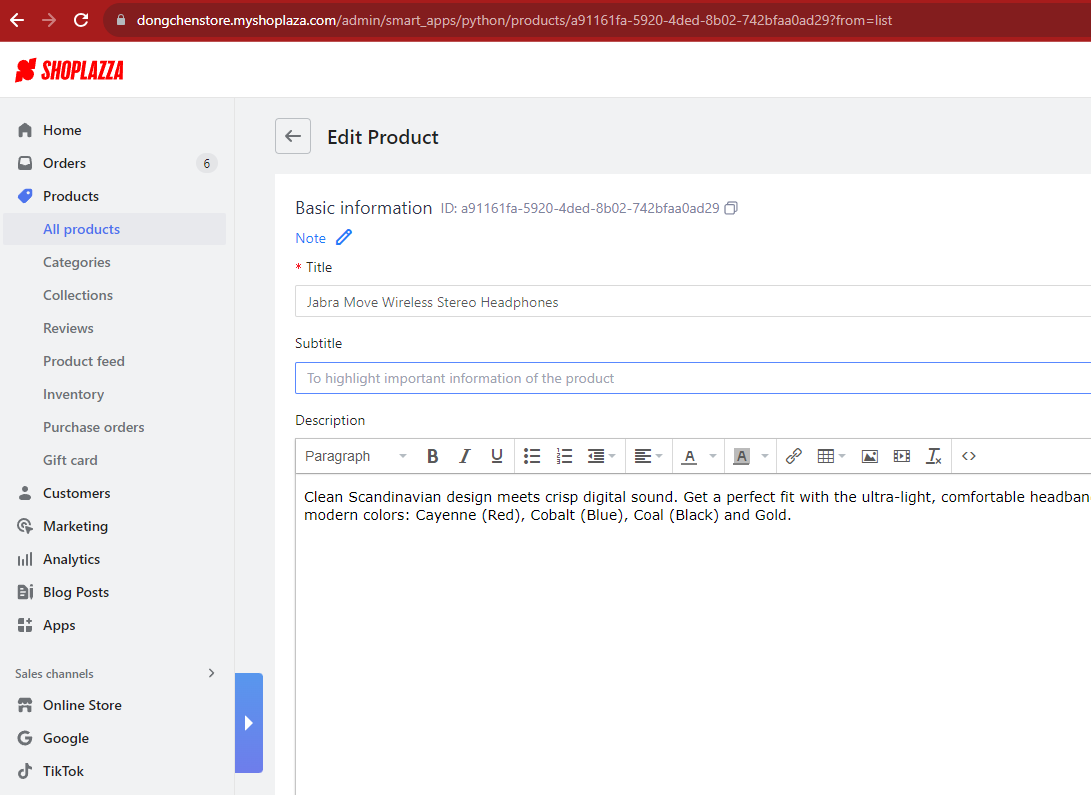
To find a Product ID, go to All Products, open the product's detail page, and read the ID in either place:
- Next to the Basic Information section.
- In the product's URL in your browser's address bar.
Other entities such as Orders and Customers work the same way — find the ID in the entity's detail URL or on its detail page.
Through List API
Any list endpoint returns each item's id. For example, the Product List API returns products with their IDs:
{
  "products": [
    {
      "id": "c1d5b2a3-fab1-4e26-8582-75d3b2677042",
      "title": "aasd",
      "handle": "asd-bkpq",
      ...
    }
  ]
}
The same approach works for Customers, Orders, and other resources.